End Call Reporting
 Updated
by
BCH Digital Support
Updated
by
BCH Digital Support
How does it work?
This service allows you to configure what happens to transaction data after a transaction is processed.
Accessing the service
You can access this service by going to Card Payment Processing > End Call Reporting
Configuring a number's transaction data
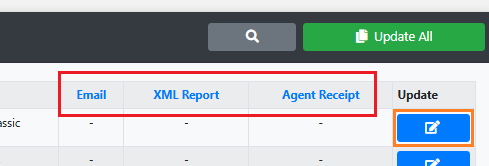
To configure one of the columns you must first click on the header of the type you wish to change, then click the Update button.
Emailed Reports
You can email data from Successful, Failed or All transaction attempts.
Recipient
Set a single email address or create an email group in Management & Reports > Email Groups and add multiple addresses.
Group
The email group to send the transaction report to.
Email address
The email address to send the transaction report to.
Originator
The originator of the transaction email that is sent to the email address.
XML Report
XML Report
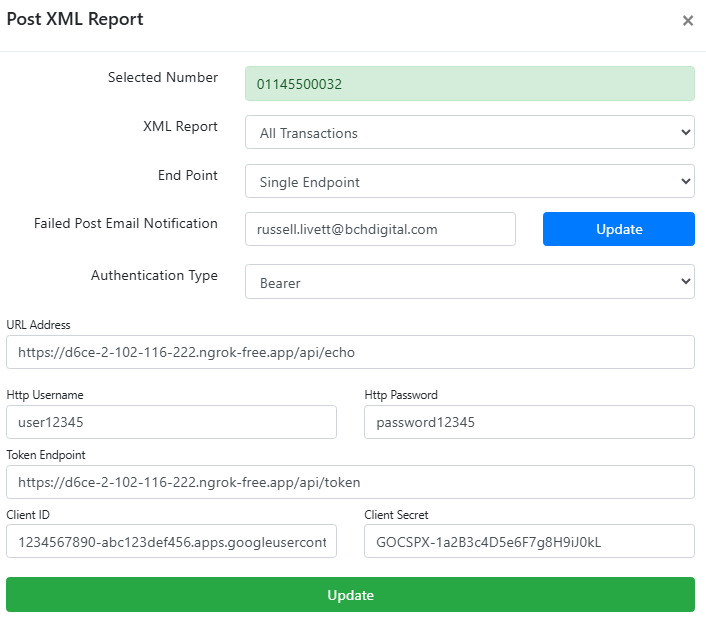
You can POST data from Successful, Failed or All transaction attempts.
End Point
Choose from a single endpoint or multiple
Failed POST Email Notification
If a POST to an endpoint fails for any reason, an email notification can be sent to an email address.
Authentication Type
Basic
URL Address (HTTPS only)
HTTP Username
HTTP Password
Bearer (OAuth)
URL Address (HTTPS only)
HTTP Username
HTTP Password
Token Endpoint
Client ID
Client Secret
Agent Receipt
If the agent has an email address setup on their Agent profile it will be sent to that email.
