SMS 2 Email
 Updated
by
BCH Digital Support
Updated
by
BCH Digital Support
What is it?
This service allows a customer to send an SMS to a long number on your account and have it sent via a configured email.
Accessing the Service
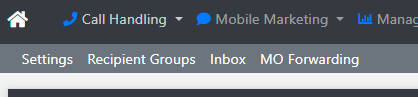
This service is nested inside the Email 2 SMS service. You can find the service under Mobile Marketing > Email 2 SMS:

Then click on MO Forwarding in the sub-menu:
Configuring the Service
Create new setup
Click Add MO Forwarding to add a new setup.

Long Number
Pick a long number that is assigned to your account.
Email Address
Set the email address that messages are to be sent to.
Always Forward
Having an Email 2 SMS setup with a Sender Type of Long Number will allow you to utilize Always Forward.
Always Forward = Yes
The SMS generated email will be sent to the Email address setup in MO Forwarding. Use this if you will only ever receive SMS via email with no sending.
Always Forward = No
The SMS generated email will be sent to the original email address that initiated the first SMS. Use this if you're using Email 2 SMS together.
For example:
The wildcard address of *@yourCompany.com is setup on Email 2 SMS with a Sender Type Long Number as 447458122019. John@yourCompany.com emails 07777123456@sms.telecomstats.co.uk.
07777123456 responds to 447458122019
Always Forward = Yes
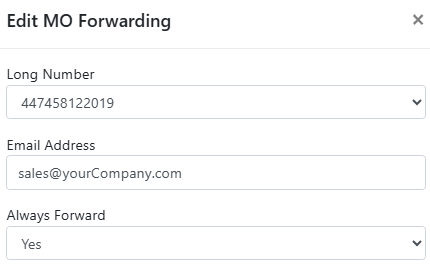
The SMS generated email will be sent to sales@yourCompany.com.
Always Forward = No
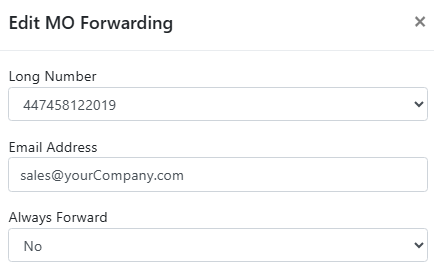
The SMS generated email will be sent to John@yourCompany.com.
